mcp-use
Model Context Protocol向けフルスタックフレームワーク。Python/TypeScriptで数行のコードでMCPサーバー・クライアント・AIエージェントを構築可能。
agentic-frameworkaillmsmcp-servermcp-clientmcp-inspectormcp-uipythontypescript
README
<div align="center">
<div align="center" style="margin: 0 auto; max-width: 80%;">
<a href="https://mcp-use.com">
<picture>
<source media="(prefers-color-scheme: dark)" srcset="./static/logo_white.svg">
<source media="(prefers-color-scheme: light)" srcset="./static/logo_black.svg">
<img alt="mcp use logo" src="./static/logo_black.svg" width="80%" style="margin: 20px auto;">
</picture>
</a>
</div>
<h1 align="center" style="border:0; font-style:italic; font-weight:300;">Full-Stack MCP Framework</h1>
<p align="center" style="max-width:600px; margin-bottom:40px">
<b>mcp-use</b> provides everything you need to build with <a href="https://modelcontextprotocol.io">Model Context Protocol</a> <br/> MCP servers, MCP clients and AI agents in 6 lines of code, in both <b>Python</b> and <b>TypeScript</b>.</p>
<p align="center">
<a href="https://github.com/mcp-use/mcp-use/stargazers" alt="GitHub stars">
<img src="https://img.shields.io/github/stars/mcp-use/mcp-use?style=social" /></a>
<a href="https://github.com/mcp-use/mcp-use/blob/main/LICENSE" alt="License">
<img src="https://img.shields.io/github/license/mcp-use/mcp-use" /></a>
<a href="https://mcp-use.com/docs" alt="Documentation">
<img src="https://img.shields.io/badge/mcp--use-docs-red" /></a>
<a href="https://mcp-use.com" alt="Website">
<img src="https://img.shields.io/badge/cloud-mcp--use.com-blue" /></a>
<a href="https://x.com/mcpuse" alt="X follow mcp-use">
<img src="https://img.shields.io/twitter/follow/mcp-use?style=social" /></a>
<a href="https://discord.gg/XkNkSkMz3V" alt="Discord">
<img src="https://dcbadge.limes.pink/api/server/XkNkSkMz3V?style=flat" /></a>
<br/>
<a href="https://github.com/mcp-use/mcp-use/tree/main/libraries/python" alt="Python repository">
<img src="https://img.shields.io/badge/pyhton-repo-grey?labelColor=white&logo=python" alt="Badge"></a>
<a href="https://pypi.org/project/mcp_use/" alt="PyPI Version">
<img src="https://img.shields.io/pypi/v/mcp_use.svg"/></a>
<a href="https://pypi.org/project/mcp_use/" alt="PyPI Downloads">
<img src="https://static.pepy.tech/badge/mcp-use" /></a>
<a href="https://mcp-use.com/docs/python" alt="Python Documentation">
<img src="https://img.shields.io/badge/python-docs-red" /></a>
<a href="https://github.com/mcp-use/mcp-use/actions/workflows/conformance.yml" alt="Python MCP Conformance">
<img src="https://img.shields.io/endpoint?url=https://gist.githubusercontent.com/tonxxd/6edf670f0446dc9f7a1f32d6bfda2b70/raw/python-conformance.json" /></a>
<br/>
<a href="https://github.com/mcp-use/mcp-use/tree/main/libraries/typescript" alt="Typescript Documentation">
<img src="https://img.shields.io/badge/typescript-repo-grey?labelColor=white&logo=typescript" alt="Badge"></a>
<a href="https://www.npmjs.com/package/mcp-use" alt="NPM Version">
<img src="https://img.shields.io/npm/v/mcp-use.svg"/></a>
<a href="https://www.npmjs.com/package/mcp-use" alt="NPM Downloads">
<img src="https://img.shields.io/npm/dw/mcp-use.svg"/></a>
<a href="https://mcp-use.com/docs/typescript" alt="Typescript Documentation">
<img src="https://img.shields.io/badge/typescript-docs-red" /></a>
<a href="https://github.com/mcp-use/mcp-use/actions/workflows/conformance.yml" alt="TypeScript MCP Conformance">
<img src="https://img.shields.io/endpoint?url=https://gist.githubusercontent.com/tonxxd/6edf670f0446dc9f7a1f32d6bfda2b70/raw/typescript-conformance.json" /></a>
<a href="https://pkg.pr.new/~/mcp-use/mcp-use" alt="Open PR Package Preview">
<img src="https://pkg.pr.new/badge/mcp-use/mcp-use" /></a>
<br/>
<a href="https://inspector.mcp-use.com" alt="MCP Inspector Online">
<img src="https://img.shields.io/badge/MCP%20Inspector-black" /></a>
<a href="https://mcp-use.com" alt="MCP Deploy">
<img src="https://img.shields.io/badge/Deploy%20MCP-black" /></a>
</p>
</div>
---
## Stack
- **🤖 MCP Agents** - AI agents that can use tools and reason across steps
- **🔌 MCP Clients** - Connect any LLM to any MCP server
- **🛠️ MCP Servers** - Build your own MCP servers
- **🔍 MCP Inspector** - Web-based debugger for MCP servers
- **🎨 MCP-UI Resources** - Build ChatGPT apps with interactive widgets
---
<h2 align="left" style="border:0; margin-top:50px">🚀 What Do You Want to Build?</h2>
<table>
<tr>
<td width="50%" valign="top">
<h3>🤖 Build an AI Agent</h3>
<p>Create intelligent agents that can use tools, browse the web, manage files, and more.</p>
<p>
<a href="#build-an-ai-agent">Quick Start ↓</a> |
<a href="https://mcp-use.com/docs/python/agent/agent-configuration">Python Docs</a> |
<a href="https://mcp-use.com/docs/typescript/agent/agent-configuration">TypeScript Docs</a>
</p>
</td>
<td width="50%" valign="top">
<h3>🔌 Use MCP Client</h3>
<p>Connect directly to MCP servers and call tools programmatically without an agent.</p>
<p>
<a href="#use-mcp-client">Quick Start ↓</a> |
<a href="https://mcp-use.com/docs/python/client/client-configuration">Python Docs</a> |
<a href="https://mcp-use.com/docs/typescript/client/client-configuration">TypeScript Docs</a>
</p>
</td>
</tr>
<tr>
<td width="50%" valign="top">
<h3>🛠️ Create an MCP Server</h3>
<p>Build your own MCP servers with tools, resources, and prompts.</p>
<p>
<a href="#create-an-mcp-server">Quick Start ↓</a> |
<a href="https://mcp-use.com/docs/python/server/index">Python Docs</a> |
<a href="https://mcp-use.com/docs/typescript/server/getting-started">TypeScript Docs</a>
</p>
</td>
<td width="50%" valign="top">
<h3>🔍 Debug with Inspector</h3>
<p>Test, debug, and explore your MCP servers interactively.</p>
<p>
<a href="#use-the-inspector">Quick Start ↓</a> |
<a href="https://mcp-use.com/docs/inspector/index">Inspector Docs</a> |
<a href="https://inspector.mcp-use.com">MCP Inspector online</a>
</p>
</td>
</tr>
<tr>
<td width="50%" valign="top">
<h3>🎨 Build ChatGPT Apps</h3>
<p>Create interactive UIs with mcp-ui, react and live reload.</p>
<p>
<a href="https://mcp-use.com/docs/typescript/server/ui-widgets">Quick Start</a> |
<a href="https://mcp-use.com/docs/typescript/server/templates">Templates</a>
</p>
</td>
<td width="50%" valign="top">
<h3>☁️ Deploy to MCP Cloud</h3>
<p>Deploy and manage your MCP agents and servers in the cloud.</p>
<p>
<a href="https://mcp-use.com/docs/home/mcp101">Quick Start</a> |
<a href="https://mcp-use.com">Cloud ↗</a>
</p>
</td>
</tr>
</table>
---
<h2 style="border:0; margin-top:30px;">📦 Quick Start</h2>
### Build an AI Agent
Create an AI agent that can use MCP tools to accomplish complex tasks.
#### <img src="./static/python.svg" height="14" style="margin-right:4px; top:-1px; position:relative;" align="center" /> Python
```bash
pip install mcp-use langchain-openai
```
```python
import asyncio
from langchain_openai import ChatOpenAI
from mcp_use import MCPAgent, MCPClient
async def main():
# Configure MCP server
config = {
"mcpServers": {
"filesystem": {
"command": "npx",
"args": ["-y", "@modelcontextprotocol/server-filesystem", "/tmp"]
}
}
}
client = MCPClient.from_dict(config)
llm = ChatOpenAI(model="gpt-4o")
agent = MCPAgent(llm=llm, client=client)
result = await agent.run("List all files in the directory")
print(result)
asyncio.run(main())
```
[**→ Full Python Agent Documentation**](./libraries/python/README.md#quick-start)
#### <img src="./static/typescript.svg" height="14" style="margin-right:4px; top:-1px; position:relative;" align="center" /> Typescript
```bash
npm install mcp-use @langchain/openai
```
```typescript
import { ChatOpenAI } from "@langchain/openai";
import { MCPAgent, MCPClient } from "mcp-use";
async function main() {
// Configure MCP server
const config = {
mcpServers: {
filesystem: {
command: "npx",
args: ["-y", "@modelcontextprotocol/server-filesystem", "/tmp"],
},
},
};
const client = MCPClient.fromDict(config);
const llm = new ChatOpenAI({ modelName: "gpt-4o" });
const agent = new MCPAgent({ llm, client });
const result = await agent.run("List all files in the directory");
console.log(result);
}
main();
```
[**→ Full TypeScript Agent Documentation**](./libraries/typescript/README.md#-quick-start)
---
### Use MCP Client
Connect to MCP servers directly without an AI agent for programmatic tool access.
#### <img src="./static/python.svg" height="14" style="margin-right:4px; top:-1px; position:relative;" align="center" /> Python
```python
import asyncio
from mcp_use import MCPClient
async def main():
config = {
"mcpServers": {
"calculator": {
"command": "npx",
"args": ["-y", "@modelcontextprotocol/server-everything"]
}
}
}
client = MCPClient.from_dict(config)
await client.create_all_sessions()
session = client.get_session("calculator")
result = await session.call_tool(name="add", arguments={"a": 5, "b": 3})
print(f"Result: {result.content[0].text}")
await client.close_all_sessions()
asyncio.run(main())
```
[**→ Python Client Documentation**](./libraries/python/README.md#direct-tool-calls-without-llm)
#### <img src="./static/typescript.svg" height="14" style="margin-right:4px; top:-1px; position:relative;" align="center" /> Typescript
```typescript
import { MCPClient } from "mcp-use";
async function main() {
const config = {
mcpServers: {
calculator: {
command: "npx",
args: ["-y", "@modelcontextprotocol/server-everything"],
},
},
};
const client = new MCPClient(config);
await client.createAllSessions();
const session = client.getSession("calculator");
const result = await session.callTool("add", { a: 5, b: 3 });
console.log(`Result: ${result.content[0].text}`);
await client.closeAllSessions();
}
main();
```
[**→ TypeScript Client Documentation**](./libraries/typescript/README.md#basic-usage)
---
### Create an MCP Server
Build your own MCP server with custom tools, resources, and prompts.
#### <img src="./static/typescript.svg" height="14" style="margin-right:4px; top:-1px; position:relative;" align="center" /> Typescript
```bash
npx create-mcp-use-app my-server
cd my-server
npm install
```
```typescript
import { MCPServer, text } from "mcp-use/server";
import { z } from "zod";
const server = new MCPServer({
name: "my-server",
version: "1.0.0",
description: "My custom MCP server",
});
// Define a tool
server.tool(
{
name: "get_weather",
description: "Get weather for a city",
schema: z.object({
city: z.string().describe("City name"),
}),
},
async ({ city }) => {
return text(`Temperature: 72°F, Condition: sunny, City: ${city}`);
}
);
// Start server with auto-inspector
server.listen(3000);
// 🎉 Inspector at http://localhost:3000/inspector
```
[**→ Full TypeScript Server Documentation**](./libraries/typescript/README.md#%EF%B8%8F-mcp-server-framework)
#### <img src="./static/python.svg" height="14" style="margin-right:4px; top:-1px; position:relative;" align="center" /> Python
**Coming Soon!** For now, please use the TypeScript implementation to create MCP servers.
---
### Use the Inspector
Debug and test your MCP servers with the interactive web-based inspector.
#### Automatic (with mcp-use server)
When you create a server with `mcp-use`, the inspector is automatically available:
```typescript
server.listen(3000);
// Inspector automatically at: http://localhost:3000/inspector
```
#### Standalone
Inspect any MCP server via CLI:
```bash
npx @mcp-use/inspector --url http://localhost:3000/sse
```
**Features:**
- 🔍 Test tools interactively with live execution
- 📊 Monitor connection status and server health
- 🔐 Handle OAuth flows automatically
- 💾 Persistent sessions with localStorage
[**→ Full Inspector Documentation**](./libraries/typescript/packages/inspector/README.md)
---
## 📚 More Examples & Documentation
### Example Use Cases
- **[Web Browsing with Playwright](./libraries/python/README.md#web-browsing-with-playwright)** - Automate browser tasks
- **[Multi-Server Setup](./libraries/python/README.md#multi-server-support)** - Use multiple MCP servers together
- **[Streaming Responses](./libraries/python/README.md#streaming-agent-output)** - Real-time agent output
- **[UI Widgets](./libraries/typescript/README.md#building-custom-ui-widgets)** - Build interactive React components
- **[AI SDK Integration](./libraries/typescript/README.md#-ai-sdk-integration)** - Vercel AI SDK for Next.js apps
### Complete Documentation
- **[📘 Python Documentation](./libraries/python/README.md)** - Complete Python guide
- **[📗 TypeScript Documentation](./libraries/typescript/README.md)** - Complete TypeScript guide
- **[🔍 Inspector Documentation](./libraries/typescript/packages/inspector/README.md)** - Inspector guide
- **[🌐 Online Docs](https://mcp-use.com/docs)** - Full online documentation
---
## ✨ Key Features
<table>
<tr>
<th width="200">Feature</th>
<th>Description</th>
<th>Python</th>
<th>TypeScript</th>
</tr>
<tr>
<td><strong>🤖 MCP Agents</strong></td>
<td>AI agents with tool access and multi-step reasoning</td>
<td align="center">✅</td>
<td align="center">✅</td>
</tr>
<tr>
<td><strong>🔌 MCP Clients</strong></td>
<td>Direct connection to any MCP server</td>
<td align="center">✅</td>
<td align="center">✅</td>
</tr>
<tr>
<td><strong>🛠️ MCP Servers</strong></td>
<td>Build custom MCP servers</td>
<td align="center">🔜</td>
<td align="center">✅</td>
</tr>
<tr>
<td><strong>🔍 Inspector</strong></td>
<td>Web-based debugging tool</td>
<td align="center">✅</td>
<td align="center">✅</td>
</tr>
<tr>
<td><strong>🎨 UI Widgets</strong></td>
<td>Build interactive React UIs</td>
<td align="center">➖</td>
<td align="center">✅</td>
</tr>
<tr>
<td><strong>🌐 Multi-Server</strong></td>
<td>Connect to multiple servers simultaneously</td>
<td align="center">✅</td>
<td align="center">✅</td>
</tr>
<tr>
<td><strong>📡 Streaming</strong></td>
<td>Real-time streaming responses</td>
<td align="center">✅</td>
<td align="center">✅</td>
</tr>
<tr>
<td><strong>📊 Observability</strong></td>
<td>Built-in Langfuse integration</td>
<td align="center">✅</td>
<td align="center">✅</td>
</tr>
<tr>
<td><strong>🔐 OAuth Support</strong></td>
<td>Built-in OAuth flow handling</td>
<td align="center">✅</td>
<td align="center">✅</td>
</tr>
<tr>
<td><strong>🛡️ Tool Control</strong></td>
<td>Restrict access to specific tools</td>
<td align="center">✅</td>
<td align="center">✅</td>
</tr>
</table>
---
## 📦 Package Overview
This monorepo contains multiple packages for both Python and TypeScript:
### Python Packages
| Package | Description | Version |
| ----------- | ------------------------------------- | --------------------------------------------------------------------------------------- |
| **mcp-use** | Complete MCP client and agent library | [](https://pypi.org/project/mcp_use/) |
### TypeScript Packages
| Package | Description | Version |
| ---------------------- | ----------------------------------------------- | --------------------------------------------------------------------------------------------------------------- |
| **mcp-use** | Core framework for clients, agents, and servers | [](https://www.npmjs.com/package/mcp-use) |
| **@mcp-use/cli** | Build tool with hot reload and auto-inspector | [](https://www.npmjs.com/package/@mcp-use/cli) |
| **@mcp-use/inspector** | Web-based debugger for MCP servers | [](https://www.npmjs.com/package/@mcp-use/inspector) |
| **create-mcp-use-app** | Project scaffolding tool | [](https://www.npmjs.com/package/create-mcp-use-app) |
---
## 🏗️ Repository Structure
```
mcp-use/
├── libraries/
│ ├── python/ → Python implementation
│ │ ├── mcp_use/ → Core library
│ │ ├── examples/ → Python examples
│ │ └── docs/ → Python documentation
│ │
│ └── typescript/ → TypeScript implementation
│ └── packages/
│ ├── mcp-use/ → Core framework
│ ├── cli/ → Build tool
│ ├── inspector/ → Web inspector
│ └── create-mcp-use-app/ → Scaffolding
└── README.md → This file
```
---
## 🌟 Why MCP-Use?
### Complete Vertical Stack
Build everything from AI agents to servers - not just clients. Create the full MCP ecosystem in your preferred language.
### Language Flexibility
Choose Python for ML/data workflows or TypeScript for web applications. Same great features, different languages.
### Production Ready
Includes observability, streaming, multi-server support, sandboxing, and tool access controls out of the box.
### Developer Experience
Hot reload, TypeScript/Python type safety, built-in inspector, and comprehensive documentation.
### Open Source
MIT licensed and community-driven. Contribute, fork, or extend as needed.
---
## 🤝 Community & Support
- **💬 Discord**: [Join our community](https://discord.gg/XkNkSkMz3V)
- **🐛 GitHub Issues**: [Report bugs or request features](https://github.com/mcp-use/mcp-use/issues)
- **📖 Documentation**: [mcp-use.com/docs](https://mcp-use.com/docs)
- **🌐 Website**: [mcp-use.com](https://mcp-use.com)
- **🐦 Twitter**: Follow [@pietrozullo](https://x.com/pietrozullo) and [@pederzh](https://x.com/pederzh)
---
## 📜 License
MIT © [MCP-Use Contributors](https://github.com/mcp-use/mcp-use/graphs/contributors)
---
## 🙏 Contributing
We love contributions! Check out our contributing guidelines:
[CONTRIBUTING.md](https://github.com/mcp-use/mcp-use/blob/main/CONTRIBUTING.md)
---
## ⭐ Star History
[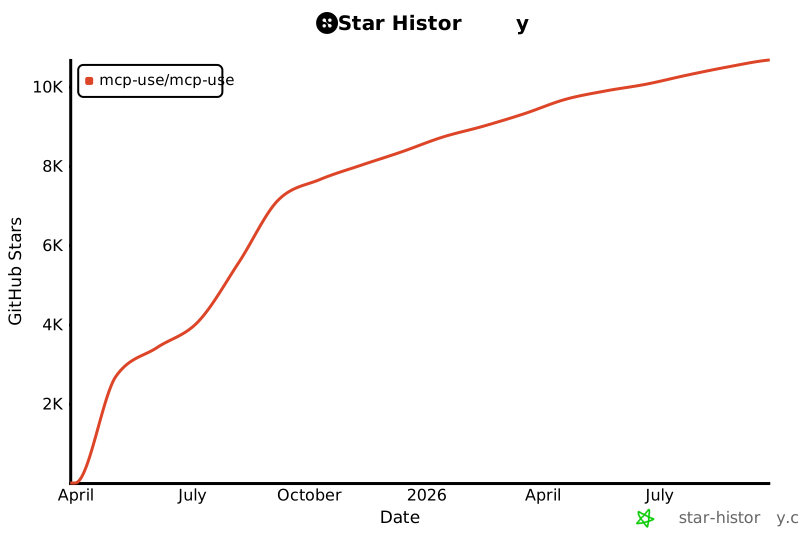](https://www.star-history.com/#mcp-use/mcp-use&Date)
---
## 📝 Citation
If you use MCP-Use in your research or project, please cite:
```bibtex
@software{mcp_use2025,
author = {Zullo, Pietro and Contributors},
title = {MCP-Use: Complete MCP Ecosystem for Python and TypeScript},
year = {2025},
publisher = {GitHub},
url = {https://github.com/mcp-use/mcp-use}
}
```
---
## Contributors
Thanks to all our amazing contributors!
### Core Contributors
1. **Pietro** ([@pietrozullo](https://github.com/pietrozullo))
2. **Luigi** ([@pederzh](https://github.com/pederzh))
3. **Enrico** ([@tonxxd](https://github.com/tonxxd))
<br>
<a href="https://github.com/mcp-use/mcp-use/graphs/contributors">
<img src="https://contrib.rocks/image?repo=mcp-use/mcp-use" />
</a>
---
<div align="center">
<strong>Built with ❤️ by the MCP-Use community</strong>
<br/>
<sub>San Francisco | Zürich</sub>
</div>